
Member/Point
< Member
Vend88 supports a points system. Members can earn points through purchases, participation in activities, and other methods, and can redeem their points for rewards such as account balance or coupons.
Earning Points
Point Earning Rules
To earn points, the following requirements must be met:
- The customer must be a member of the store.
- The member must hold a valid membership card, and the points multiplier of the membership card plan must not be 0.
- The store must have a basic point conversion rule configured, such as: spend $1 to earn 1 point.
Point Earning Process
- A member with a valid membership card makes a purchase at the store.
- Present the membership card during payment, then complete the payment.
- The corresponding points will be added to the member's account.
Point Calculation Rules
The points earned from a purchase are calculated using the following formula:
Where:
- Amount Spent: The actual amount spent by the member on the purchase.
- Basic Point Conversion Amount: The amount that must be spent to earn 1 point, as configured by the store.
- Membership Card Points Multiplier: The points multiplier of the member's membership card.
- The final result is rounded down to the nearest integer, with the decimal portion discarded.
Example
Suppose a member spends $235.50, the store's basic point conversion rule is 1 point for every $10 spent, and the member's membership card has a points multiplier of ×1.5. The calculation is:
The result is then rounded down:
Therefore, the member earns 35 points from this purchase.
Redeeming Points
VendPOS allows members to redeem their points for account balance, which can be used for in-store purchases, or for coupons.
Redemption Rules
- Global rules:
- Total redemption limit: The total number of times a point redemption rule can be used can be configured. Once the specified redemption limit has been reached, the rule can no longer be used.
- Redemption period: A start and end time can be configured for a point redemption rule. Points can only be redeemed during the specified period.
- Account balance redemption rules: The number of points required to redeem $1 of account balance can be configured.
- Redemption rate: Sets the number of points required to redeem $1 of account balance.
- Example: Set 100 points = $1.
- Minimum redemption points: The minimum number of points required for each redemption can be configured.
- Example: If the redemption rate is 100 points = $1 and the minimum redemption amount is set to 500 points, the member must use at least 500 points per redemption and can redeem them for $5 of account balance. Amounts below $5 cannot be redeemed.
- Allow partial redemption units: Determines whether points that do not make up a complete redemption unit can be redeemed proportionally for account balance.
- Example: If a member has 531 points and the redemption rate is 100 points = $1, when partial redemption units are allowed, all 531 points can be redeemed for $5.31. If partial redemption units are not allowed, only 500 points can be redeemed for $5, and the remaining 31 points cannot be used for that redemption.
- Redemption rate: Sets the number of points required to redeem $1 of account balance.
- Coupon redemption rules: The number of points required to redeem one coupon from a specified coupon plan can be configured. The validity period of the redeemed coupon is calculated according to the validity rules configured in the corresponding coupon plan.
- Example: Set 2000 points to redeem one ramen coupon.
Redemption Methods
Redeeming in VendPOS
- Redeeming for account balance: There are two ways to redeem points for account balance:
- Redeem through the member page: Select the member who wants to redeem points from the member list, then click Point Redemption and select a point-for-balance redemption activity. Click Redeem. The corresponding points will be deducted, and the redeemed amount will automatically be added to the member's account balance.
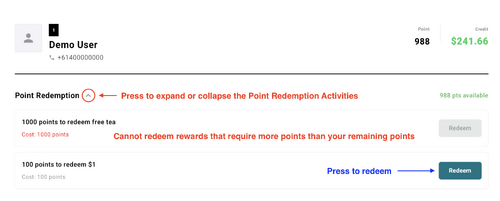
Select a point redemption activity
- Redeem through the payment page: First, select a member for the current order. After selecting the member, the Member Points option will appear at the bottom of the payment page. Click this option and select a point-for-balance redemption activity. In the pop-up window, enter the number of points to redeem. The corresponding discount amount will automatically be displayed below based on the number of points entered. After confirmation, the redeemed amount will automatically be applied to the order as a discount and deducted from the order total. To change the number of points being redeemed, repeat the steps above and enter a new amount. Once the order is completed, the corresponding points will automatically be deducted from the member's account.
- Redeem through the member page: Select the member who wants to redeem points from the member list, then click Point Redemption and select a point-for-balance redemption activity. Click Redeem. The corresponding points will be deducted, and the redeemed amount will automatically be added to the member's account balance.

 |
 |
 |
- Redeeming for coupons: Select the member who wants to redeem points from the member list, then click Point Redemption and select a point-for-coupon redemption activity. Click Redeem. The corresponding points will be deducted, and the redeemed coupon will automatically be added to the member's account.
Redeeming on the QR Ordering Page
- Redeeming for account balance: There are two ways to redeem points for account balance:
- Redeem through the member page: Click Point Redemption on the member details page and select a point-for-balance redemption activity. Click Redeem. The corresponding points will be deducted, and the redeemed amount will automatically be added to the member's account balance.
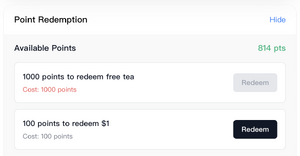
Select a point redemption activity
- Redeem through the payment page: After selecting all items, click Checkout. The Member Points option will be displayed on the checkout page. Click this option and select a point-for-balance redemption activity. In the pop-up window, enter the number of points to redeem. The corresponding discount amount will automatically be displayed below based on the number of points entered. After confirmation, the redeemed amount will automatically be applied to the order as a discount and deducted from the order total. To change the number of points being redeemed, click Modify Redeemed Points or Remove Redemption. Once the order is completed, the corresponding points will automatically be deducted from the member's account.
- Redeem through the member page: Click Point Redemption on the member details page and select a point-for-balance redemption activity. Click Redeem. The corresponding points will be deducted, and the redeemed amount will automatically be added to the member's account balance.

 |
 |
 |
- Redeeming for coupons: Click Point Redemption on the member details page and select a point-for-coupon redemption activity. Click Redeem. The corresponding points will be deducted, and the redeemed coupon will automatically be added to the member's account.